Symbols, SourceLink and NuGet Packages
Most of us have a few lines in our project files that we copied from somewhere a long time ago: IncludeSymbols, PublishRepositoryUrl, ContinuousIntegrationBuild, and so on. They seem to work, so we never touch them again. In this article I’ll try to explain what is actually behind them. We’ll look at what symbol files are, what Source Link adds on top, and how to configure a NuGet package so that its consumers get a decent debugging experience.
Symbols
Symbol files (PDB files) hold the information that a debugger needs to relate compiled code back to the source code it was produced from.
How much we depend on them varies a lot between native and managed code. A native binary, compiled from C or C++, is just machine code. The names of functions, variables and types are gone once the compiler is done. Without symbols, a stack trace is a list of memory addresses, and debugging means reading assembly. All that information lives only in the symbol file.
In .NET the situation is quite different. An assembly contains IL and a rich set of metadata: the names of all types, methods, properties, fields and parameters. The runtime itself needs them, and that’s also why reflection works and why decompilers produce such readable code. So, what’s left for the PDB? Not that much:
- The mapping between IL instructions and the lines in the source files (so-called sequence points).
- The paths of the source files and their checksums.
- The names of local variables. IL knows locals only by index.
- Some additional info for the debugger, like the scopes of the locals, the
usingdirectives, and details about async methods and lambdas.
One common misconception is that symbols are a “Debug mode” thing. They are not. The configuration only decides whether the compiler optimizes the code, and the SDK produces a PDB file for both Debug and Release builds. The mapping may be a bit less precise in Release (e.g. an inlined method won’t appear in the stack trace at all), but the symbols are just as usable.
Let’s show the role of symbol files in action. We have a simple console application.
1
2
3
4
5
6
7
8
9
10
<Project Sdk="Microsoft.NET.Sdk">

  <PropertyGroup>
    <OutputType>Exe</OutputType>
    <TargetFramework>net10.0</TargetFramework>
    <ImplicitUsings>enable</ImplicitUsings>
    <Nullable>enable</Nullable>
  </PropertyGroup>

</Project>
1
2
3
4
5
6
7
8
9
10
11
12
internal class Program
{
    private static void Main()
    {
        Run();
    }

    static int Run()
    {
        throw new Exception("This is a sample exception.");
    }
}
 Click to enlarge
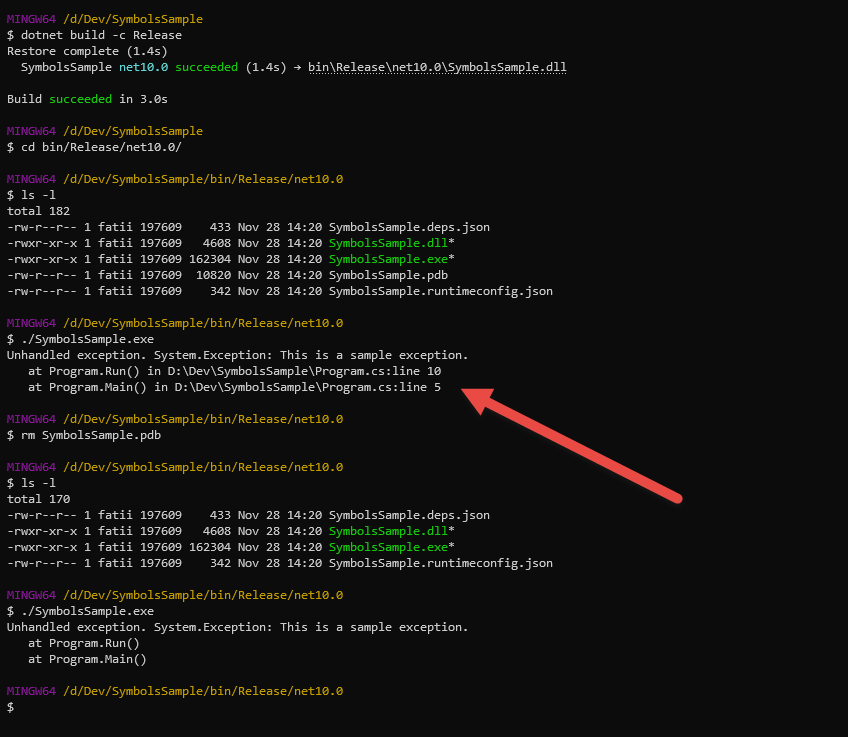
We built the app in Release mode and ran it twice. As shown in the picture above, once we delete the pdb file, the file names and the line numbers are no longer shown in the stack trace. We still have the method names though, since they’re persisted in the assembly itself.
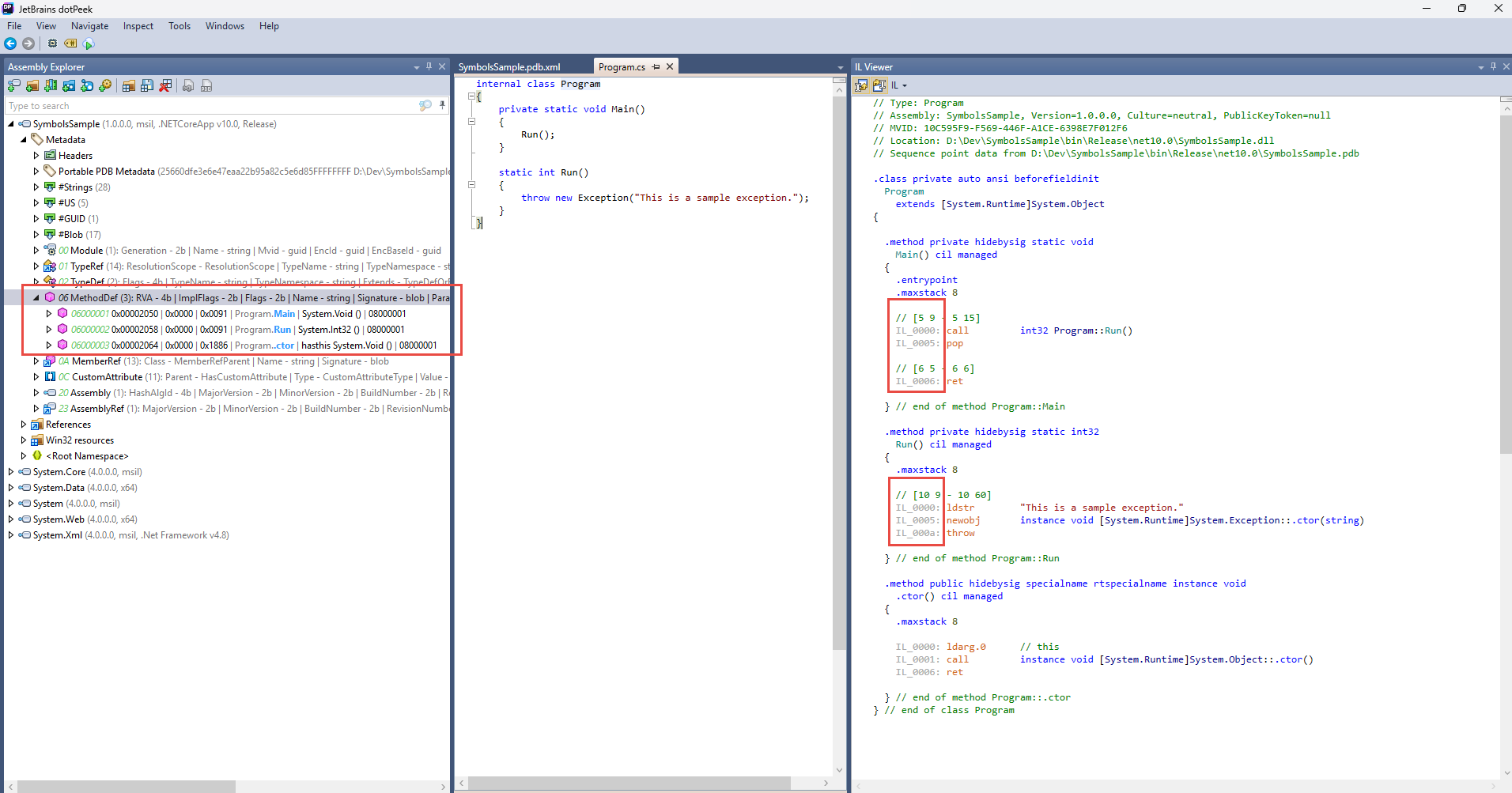
Let’s go through this step by step. We’ll use dotPeek from JetBrains (it’s a free tool) to analyze the produced dll and pdb files. First, the IL content. Here, it’s important to notice the tokens of the methods (e.g. 06000001 for Main) and the IL offsets (e.g. IL_0000) of the instructions. That’s all the runtime knows about a stack frame: which method it belongs to, and at which IL offset the execution was.
 Click to enlarge
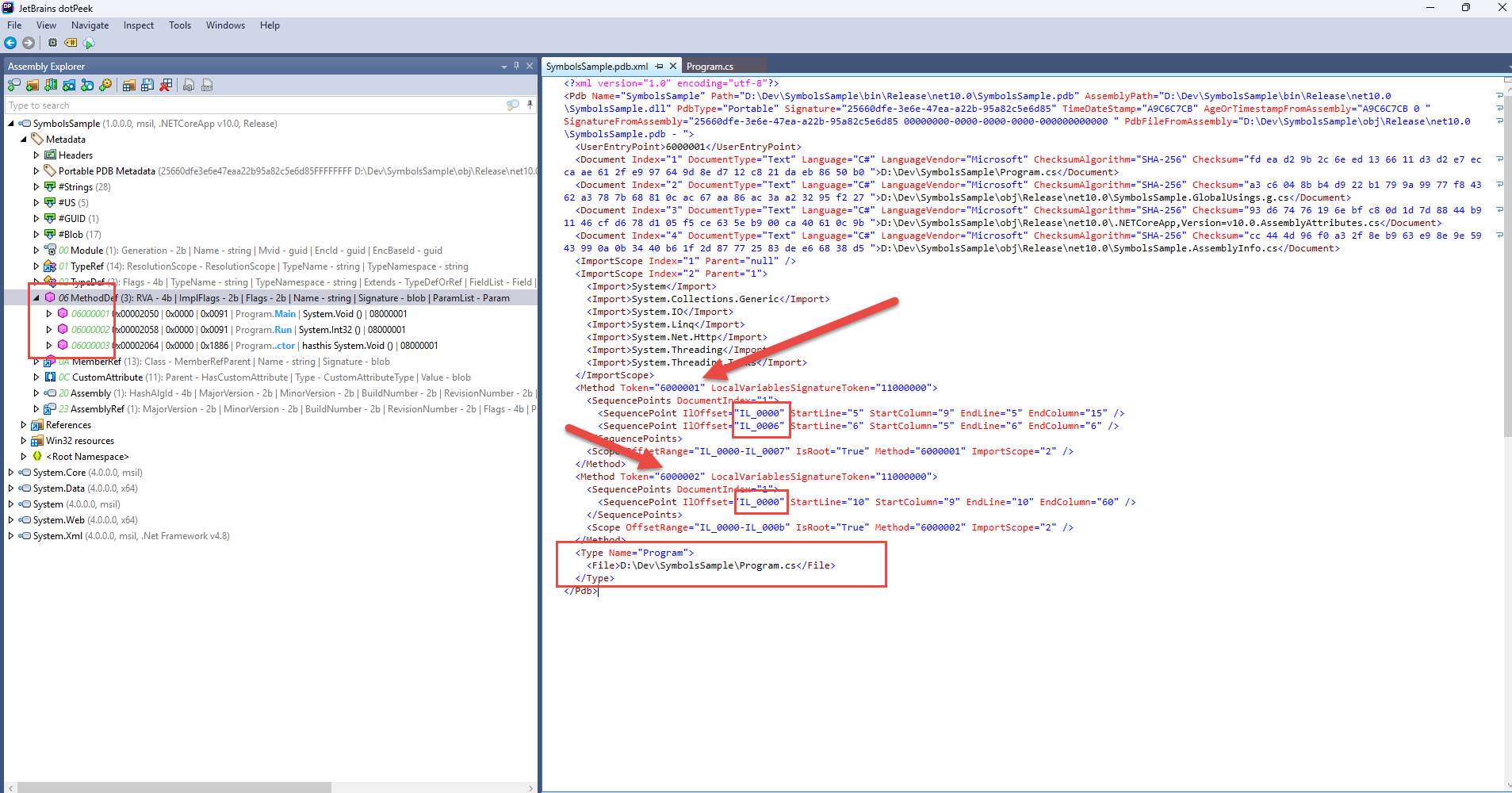
Now, let’s analyze the PDB file. The picture below shows the whole content of the PDB for this dll, extracted as XML. As you can see, it doesn’t contain any code, nor any type or method names. It refers to the methods by the same tokens we saw in the dll, and for each of them it lists the sequence points. A sequence point simply says that the instruction at a given IL offset corresponds to a given line and column in the source file. Our sample has no local variables, otherwise we’d find their names here too.
 Click to enlarge
So, when the exception is thrown in Run, the runtime takes the method token (06000002) and the IL offset, finds the matching sequence point in the PDB, and reads the line number from it: line 10. But in which file? Each sequence point references a document, and the documents are listed at the top of the PDB with their full path and checksum. The last section maps the type to its file too. That’s how D:\Dev\SymbolsSample\Program.cs:line 10 ends up in the stack trace.
Notice that it’s a path on the machine where the code was compiled. That’s fine as long as we build and debug on the same machine, the debugger just opens the file from the disk. But what if the dll came from a NuGet package and was built on some CI server? That path means nothing on our machine. This is the problem that Source Link solves.
SourceLink
As we saw, the compiler is the one that writes the locations of the source files in the PDB. Source Link adds one more piece of information next to them: a small JSON document that maps those local paths to URLs where the files can be downloaded from.
1
2
3
4
5
{
  "documents": {
    "D:\\Dev\\SymbolsSample\\*": "https://raw.githubusercontent.com/user/SymbolsSample/76992cf694b31c6e70e0bb32432db2ae05192962/*"
  }
}
During the build, Source Link reads the .git folder, takes the URL of the origin remote and the hash of the current commit, and builds the URL from them. The commit hash is the important part. The URL doesn’t point to whatever is on the main branch today, but to the exact version of the file that the dll was built from.
When we step into a method of such a library, the debugger takes the document path from the PDB, applies the mapping, downloads the file and verifies it against the checksum stored in the PDB. To us it looks like the source was there all along.
There are two things to keep in mind. First, the commit has to be pushed to the remote, otherwise the URL leads nowhere. Second, not all source files are in the repository. If you look closely at the documents in our PDB, there are a few generated files from the obj folder (global usings, assembly info). These can’t be downloaded from anywhere, so they are embedded in the PDB itself. That’s what the EmbedUntrackedSources property does.
We used to install a package like Microsoft.SourceLink.GitHub to get all this. Starting with .NET 8, Source Link is part of the SDK and enabled by default for GitHub, Azure Repos, GitLab and Bitbucket. EmbedUntrackedSources is set by default as well. So, if you build your project inside a git repository that has a remote, the mapping is already in your PDB. You can find it in the obj folder too, in the *.sourcelink.json file. A provider-specific package is needed only for other hosts (e.g. Azure DevOps Server or Gitea), or if you’re still on an older SDK.
NuGet packages
If Source Link works out of the box, what is left to configure? Mostly one thing. The Source Link information lives in the PDB, and by default the PDB is not part of the NuGet package. We have to decide how to ship it, and there are three options.
Symbol package. We publish the PDB in a separate snupkg package.
1
2
3
4
<PropertyGroup>
  <IncludeSymbols>true</IncludeSymbols>
  <SymbolPackageFormat>snupkg</SymbolPackageFormat>
</PropertyGroup>
Now dotnet pack produces a snupkg file next to the nupkg, and dotnet nuget push pushes both of them if they’re in the same folder. NuGet.org stores it on its symbol server, and debuggers download the PDB on demand. The main package stays small, and those who never debug our library pay nothing. On the other hand, the consumers have to enable the NuGet.org symbol server in their IDE, and not all feeds accept symbol packages (Azure Artifacts doesn’t). Also, the PDB is not there at runtime, so the stack traces in the consumer’s logs won’t contain line numbers for our code.
PDB in the main package. We pack the PDB file next to the dll.
1
2
3
<PropertyGroup>
  <AllowedOutputExtensionsInPackageBuildOutputFolder>$(AllowedOutputExtensionsInPackageBuildOutputFolder);.pdb</AllowedOutputExtensionsInPackageBuildOutputFolder>
</PropertyGroup>
This works with any feed and requires no symbol server. The package gets bigger though, and everybody downloads the PDB on restore whether they need it or not. There is a catch too. The PDB files of the packages are not copied to the consumer’s output folder by default, they have to opt in by setting CopyDebugSymbolFilesFromPackages in their project.
PDB embedded in the dll. There is no separate PDB file at all, the compiler embeds its content in the assembly.
1
2
3
<PropertyGroup>
  <DebugType>embedded</DebugType>
</PropertyGroup>
This is the option that always works. Any feed, no configuration on the consumer’s side, and the line numbers show up in the stack traces in production too. The price is a bigger dll for everyone, with no way to opt out.
The official recommendation for packages published to NuGet.org is the symbol package. If your feed doesn’t support it, or you prefer that things just work for your consumers, embedding the PDB is a perfectly valid choice.
There are two more properties worth setting. Here is the complete configuration.
1
2
3
4
5
6
<PropertyGroup>
  <PublishRepositoryUrl>true</PublishRepositoryUrl>
  <IncludeSymbols>true</IncludeSymbols>
  <SymbolPackageFormat>snupkg</SymbolPackageFormat>
  <ContinuousIntegrationBuild Condition="'$(GITHUB_ACTIONS)' == 'true'">true</ContinuousIntegrationBuild>
</PropertyGroup>
PublishRepositoryUrl writes the repository URL and the commit hash in the package’s nuspec file. Source Link works without it. It’s off by default so that the URL of a private repository doesn’t end up in a public package by accident. For an open source library there is no reason not to set it.
ContinuousIntegrationBuild is the more interesting one. We saw that the PDB contains absolute paths like D:\Dev\SymbolsSample\Program.cs. The same commit built on another machine, in another folder, produces a different PDB and a different dll. The build is not reproducible, and the folder structure of the build machine leaks into the package. Once we set this property, the compiler replaces the root of the repository with /_/. The document becomes /_/Program.cs, and the Source Link mapping follows.
1
2
3
4
5
{
  "documents": {
    "/_/*": "https://raw.githubusercontent.com/user/SymbolsSample/76992cf694b31c6e70e0bb32432db2ae05192962/*"
  }
}
Now the output is the same no matter where we build it. Then why not always set it to true? Because during local development the debugger uses exactly those paths to find the source files on our disk, and /_/Program.cs doesn’t exist anywhere. That’s the reason for the condition. GITHUB_ACTIONS is an environment variable that GitHub sets on its runners, so the property is enabled only for the builds that produce the actual package. Azure Pipelines has TF_BUILD for the same purpose, or you can simply pass -p:ContinuousIntegrationBuild=true to the dotnet pack command in your pipeline.
Once the package is published, it’s worth checking the result. Open the package in NuGet Package Explorer and it will tell you whether the symbols were found, whether Source Link is valid, and whether the build is deterministic. And of course, you can reference the package in some project, disable “Just My Code” in Visual Studio, and step into your own library.
That’s it. A PDB is a map from IL to source lines, Source Link tells the debugger where to download those sources from, and the few properties above make sure that both reach the people who use our packages.
I hope you found this article useful. Happy coding!
Comments powered by Disqus.